
Who can access: Super Admin, Administrator or Data Analyst roles.
The Leaderboard shows your most active Blitzz users. Framed positively, it taps into friendly competition, encourages people to improve, and lets top users inspire the rest of the team.
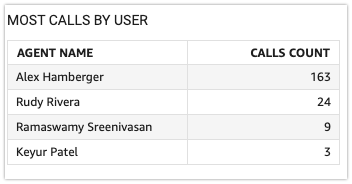
How to open the Leaderboard
- Go to Reports > Overview > Leaderboard.
- Use Select Date Filter to choose years, quarters, months, weeks or days.
Frequently asked questions
Can I see the leaderboard for a specific period?
Yes. Use the date filter to pick a timeframe.