You're in Blitzz Help Center Looking for BlitzzCam? Go to BlitzzCam Help →
Blitzz Help Center Help Center
Home Knowledge base
  • English
    • English
    • French
    • Portuguese (BR)
    • Slovak
Welcome
Login  Sign up
Contact support
Help Center › Integrations › Salesforce (VRA)

Salesforce (VRA)

Installing Blitzz on your Salesforce Instance from App Exchange Installing Blitzz on your Salesforce Instance as a Managed Package Salesforce VRA: Configure domain name for your Salesforce Organization Blitzz VRA configuration for Salesforce Assign Custom permissions set to profiles What data and metadata from Salesforce will Blitzz have access to? Updating Video Settings in Salesforce VRA Enabling Reports within Salesforce All Integrations guides →
Salesforce (VRA)

Assign Custom permissions set to profiles

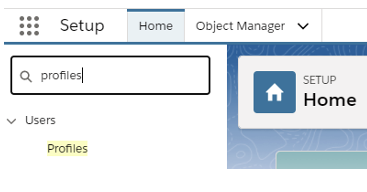
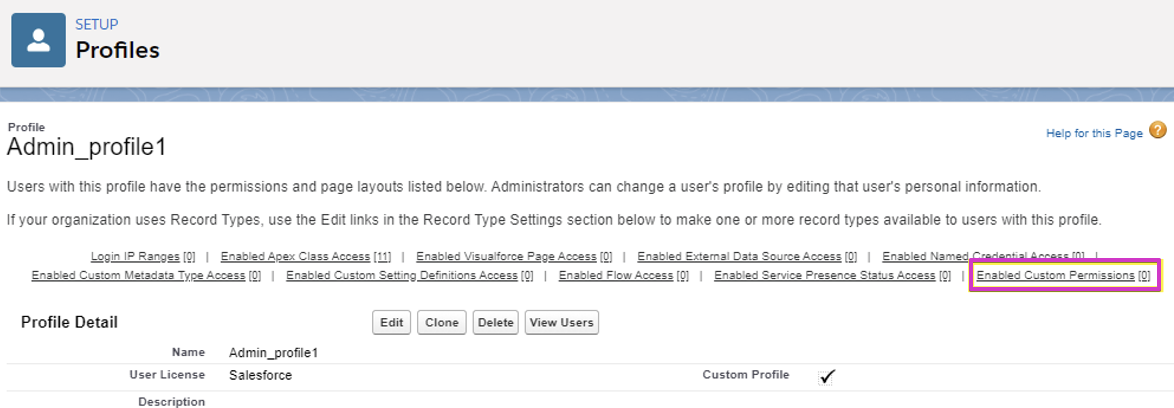
  1. Search for Settings >Profiles > Enable Custom permission > Edit under the settings menu
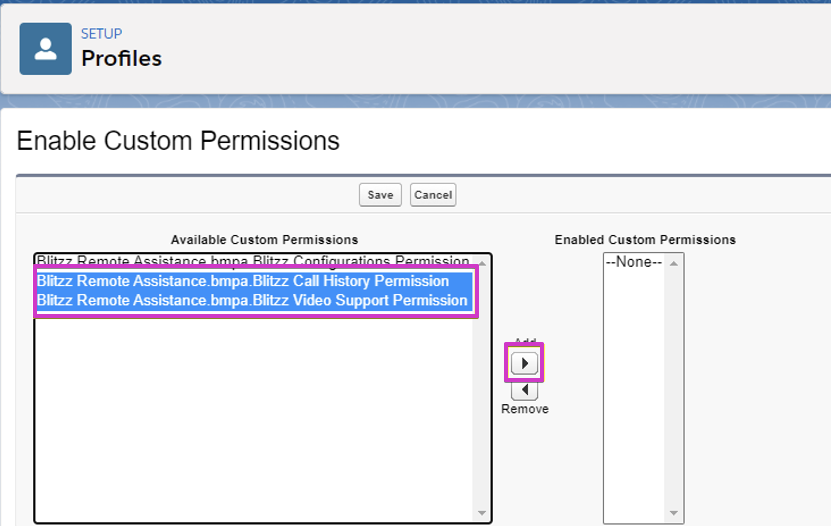
  2. Select the Blitzz Video Support and Blitzz call history permissions and click on add > Save.



Did you find it helpful? Yes No

Send feedback
Sorry we couldn't be helpful. Help us improve this article with your feedback.

Related articles

Installing Blitzz on your Salesforce Instance from App ExchangeSalesforce (VRA) Installing Blitzz on your Salesforce Instance as a Managed PackageSalesforce (VRA) Salesforce VRA: Configure domain name for your Salesforce OrganizationSalesforce (VRA) Blitzz VRA configuration for SalesforceSalesforce (VRA)
Didn't find what you need?

Our team usually replies within one business day.

Submit a ticket

On this page

Blitzz Help Center

Visual AI for every support call, inspection and jobsite.

Knowledge base Submit a ticket blitzz.co
  • English
    • English
    • French
    • Portuguese (BR)
    • Slovak
Article views count