
In some cases, participants need to download and use the lightweight Blitzz ShowMe app instead of joining in the browser.
When to use the app
- The network connection is poor.
- You need advanced features like mobile screen share or the flashlight.
- Camera or microphone permission was declined in the browser.
- Your collaboration profile is set to Force App Download (learn more).
How to switch to the app
- Open the link from your SMS or email.
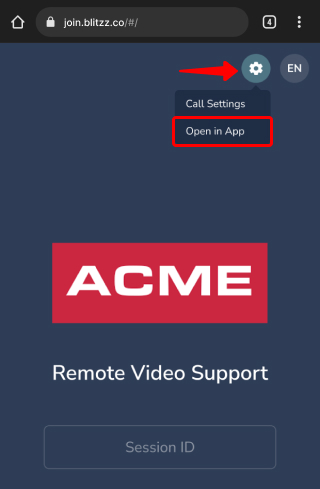
- Tap the Settings gear
 in the top right corner and install the app.
 - After installing, go back to the SMS and tap the link again. The 9-digit code fills in automatically.
Download the app
Frequently asked questions
Do I have to use the app to join a Blitzz call?
No. Most calls work in the browser. Use the app if the browser connection fails or you need app-only features.
Do I need to type the session code in the app?
Usually not. Tapping the SMS link after installing fills in the 9-digit code for you.