
If Blitzz reports don't appear or load correctly in Safari on a Mac, a Safari privacy setting is likely blocking some content. Turn off cross-site tracking prevention to fix it.
How to turn off "Prevent cross-site tracking" in Safari
- Open Safari.
- In the menu bar, click Safari > Settings.
- Open the Privacy tab.
- Uncheck Prevent cross-site tracking.
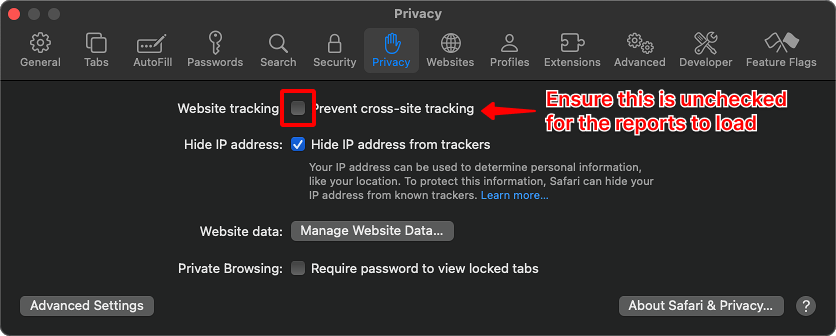
Refresh the page and load the report again. It should now display correctly.
Frequently asked questions
Why are Blitzz reports blank in Safari?
Safari's cross-site tracking prevention can block report content. Turn it off in Settings > Privacy.